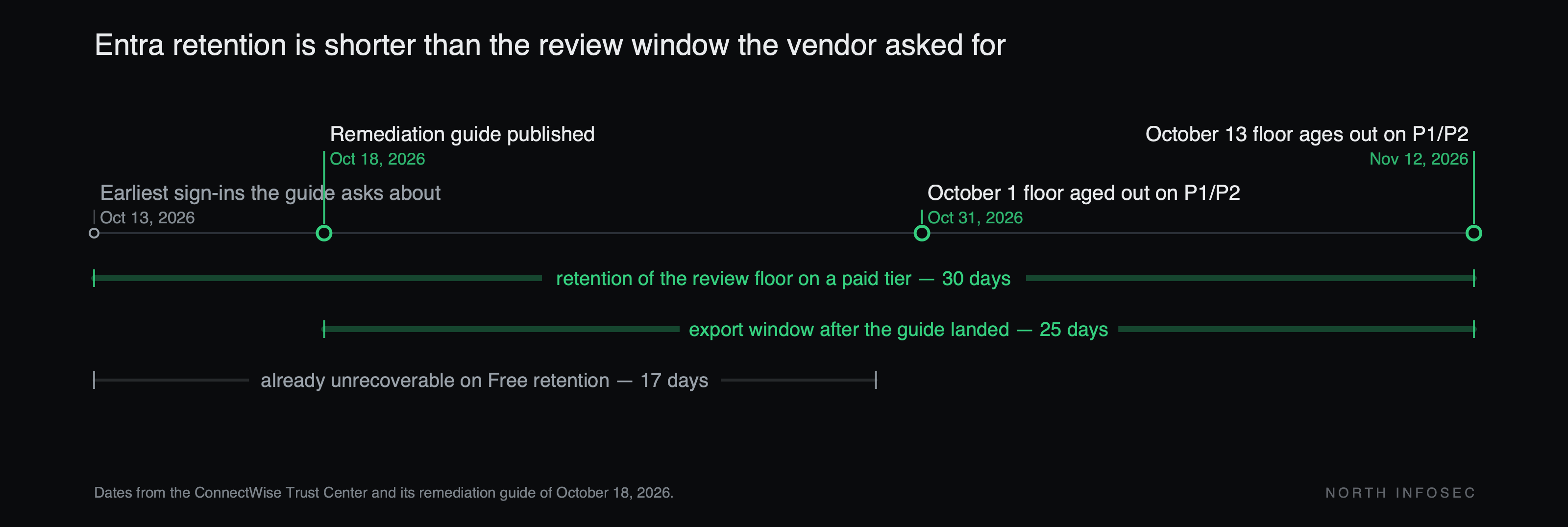
On October 18 ConnectWise published a 15-page investigation and remediation guide telling Microsoft 365 partners to review sign-in records "from October 13, 2026, through the current time," and to "extend sign-in searches back to October 1 where records are available." The same document states the retention: "Entra normally retains audit and sign-in records for seven days on Free and 30 days on P1/P2."
Do the subtraction. On a Free tenant nothing before October 30 still exists — the sign-in attempts, the discovery, the disclosure and the containment all fall before that line. On P1 or P2 the October 1 floor aged out on October 31; the October 13 floor ages out on November 12. The guide adds that "Exported/SIEM retention may be longer," so a tenant forwarding to a SIEM is better placed, and that "a license upgrade does not recover expired history." ConnectWise lists its business address with the SEC as 4110 George Road, Suite 200, Tampa.
The breached identity does not log in like a person
ConnectWise discovered the problem on October 14 and published its first advisory on October 16. Microsoft said it identified unauthorized authentication attempts from an IP address on October 15, and scripted sign-in attempts from that address were logged on October 13 and 14 with the user agent curl/7.88.1, per Huntress research reported by BleepingComputer — which is why the guide's floor is October 13.
Todyl researchers found the attacker authenticated directly to Microsoft 365 as the backup application using its secret, gaining the permissions customers had already granted it: "The sign-in requests were performed by an automated script, and since they did not involve a user login, protections such as multi-factor authentication (MFA) were ineffective." An app-only token has no user and no device, so conditional access written against users was never in the path, and the consent was already there. Service principals for the Cloud Management apps were then seen assigning themselves directory roles across nearly 50 monitored tenants, mostly Exchange Administrator. ConnectWise states backup archives "remain encrypted, isolated, and preserved, with no indication of compromise"; the exposure is in the tenant, not the archive.
Vendor-side containment did not touch your directory
Page 2 of the guide:
At 07:00 UTC on October 17, 2026, ConnectWise disabled the seven application identities listed below and revoked the associated credentials as part of our containment actions. These vendor-side actions do not change the configuration of enterprise applications within individual partner or customer tenants.
Immediately after: "Previously issued tokens may remain usable until they expire or are otherwise invalidated." The Trust Center adds that "the absence of a confirmed finding from ConnectWise is not assurance that no unauthorized activity occurred in yours."
Anyone who filed this under the vendor handled it has an enabled third-party service principal with mail, file and chat consent in their directory. Match on Application ID, not display name — older installs show SkyKick Cloud Manager names.
| Application | Application client ID |
|---|---|
| ConnectWise Cloud Backup | 506e08f9-6e9a-4da4-942b-a099a03644ae |
| ConnectWise Cloud Management | 2399d300-6fca-4e6a-a686-399fefe75b83 |
| Cloud Management - MS Teams | 24205314-2b89-4e07-a2a4-579e898a5640 |
| Cloud Management - Exchange Online | b78f6a77-d4e5-46fb-87e5-d1648bd02519 |
| Cloud Management - MS Graph | 0de14c77-b9b0-4137-9360-34878a929827 |
| Cloud Management - Partner Center | 412dcf96-176d-4b3a-a1b0-4981ad66971e |
| Cloud Management - SharePoint Online | b2b55f5b-7758-4719-8d8f-88ae172e6bdb |
The practice: set retention before you need it
Export first, triage second. Browsing the portal does not stop the window closing. Pull all four sign-in categories separately — interactive user, non-interactive user, service principal, managed identity — plus the directory audit log. The relevant events are in none of the defaults: "the default User sign-ins tab will not display the required information."
Then fix the structural version. Route Entra sign-in and audit logs to a Log Analytics workspace, storage account or SIEM via Diagnostic settings, with retention longer than your worst-case investigation window. Ninety days is a floor; a year is better if you administer other people's tenants, where you will be asked to prove a negative about someone else's date.
The cost is real. Log Analytics bills on ingestion volume, and non-interactive and service-principal sign-ins are the chattiest categories — which is why they get excluded to control spend, and why they were missing when this guide landed. The bill arrives monthly and the benefit arrives once, which is why this loses every budget argument.
If you cannot fund that this quarter, a monthly export of the service-principal sign-in category and the directory audit log to cold storage is cheap — the same gap one layer down from the six days of database access nobody saw.
How to check, this week
- Export before November 12 on P1 or P2. All four sign-in categories and the directory audit log, as JSON. On Free, record the coverage you had — the guide asks you to "note missing records and actual coverage," and a documented gap is a finding.
- Check the seven Application IDs locally. Entra ID → Enterprise applications → All applications. Record whether each is still enabled, and its local Object ID.
- Enumerate every third-party service principal holding a directory role:
Get-MgRoleManagementDirectoryRoleAssignment -ExpandProperty Principal |
  Where-Object { $_.Principal.AdditionalProperties.'@odata.type' -eq
                 '#microsoft.graph.servicePrincipal' } |
  Select-Object @{n='App';e={$_.Principal.AdditionalProperties.displayName}},
                RoleDefinitionId
- Review credentials added to any application since October 13, and the consent grants behind them. A scope like
Directory.ReadWrite.Allon a backup tool is the finding, not the role assignment that follows. - Ask who holds equivalent access at your IT provider — the admin console nobody audits is this problem with your logo on it, and "reviewing your own tenant does not review the customer's tenant."
Most organisations have never once listed their third-party service principals, what each can reach, and who owns it. That list outlasts this advisory.
North InfoSec runs AI-assisted penetration testing and security assessments, including identity and OAuth consent review of the kind described above. northinfosec.com