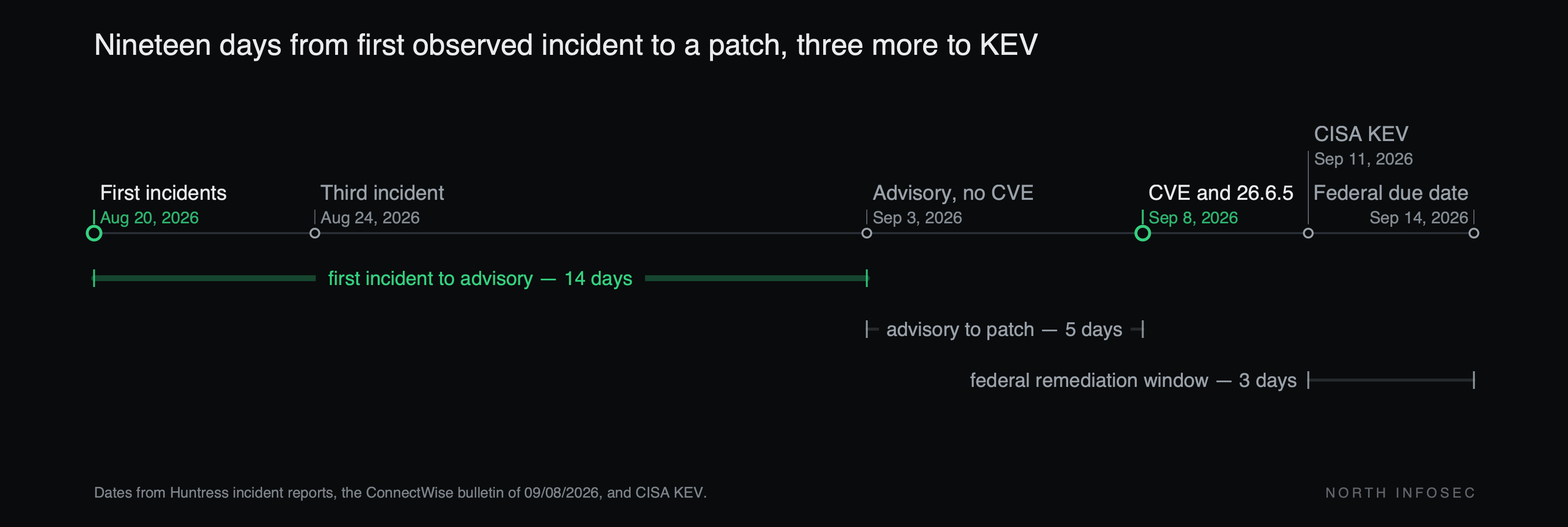
ConnectWise published a security bulletin dated 09/08/2026 for CVE-2026-84869, a CVSS 9.9 flaw in ScreenConnect, and CISA added it to the Known Exploited Vulnerabilities catalog on September 11 with a remediation due date of September 14. The most reassuring sentence in that bulletin is the one that will leave people exploitable: "ScreenConnect servers are not impacted."
That is accurate, and it is the problem. The defect is in the client, so the thing you upgrade is not the thing that gets fixed.
What the bulletin actually says
There is one affected range, not a per-edition table: "ScreenConnect version prior to 26.6.5 are impacted." NVD pins the fix at 26.6.5.9742 and carries two weaknesses — CWE-862, missing authorization, and CWE-269, improper privilege management. The condition itself allows "files to be transferred and executed through an active remote session without authorization or Host confirmation in certain circumstances."
Read the remediation table rather than the headline. The Cloud row says: "No action is required. After upgrading, make sure to reinstall your host clients and update your access agents." Those two sentences point in opposite directions, and the second is the operative half: cloud instances were already moved to 26.6.5, so the work that remains is on endpoints. The On-premise row ends with the identical instruction after telling partners to upgrade the server. Under both deployment models, the last step lands on machines the console only talks to.
The direction the payload travels
Huntress reported three critical incidents across unrelated organizations on August 20, August 20 and August 24. Each began with social engineering — a Quick Assist tech-support scam in one, a fake Geek Squad refund form in another — and ended with a rogue ScreenConnect client using wscript.exe to run four VBScript files in sequence.
In Huntress's words: "Connecting to an infected ScreenConnect client can cause the server-side Host system to receive and execute the same four-stage VBScript chain. Later, the client records each ConnectionID to avoid repeatedly targeting the same active session, but then removes that identifier after it disconnects — allowing a later reconnection to trigger the infection again."
The Host is a technician's workstation. It is the one machine with a session to every customer, and cleaning it once is not enough: the identifier that suppresses re-infection is discarded on disconnect, so the next reconnect starts over. That is the same delegated-access problem an MSP console creates, pointed the other way — inbound, from a customer endpoint toward the console operator.
ConnectWise has not linked CVE-2026-84869 to that campaign. Huntress's John Hammond told Help Net Security the CVE "is what they believe the attackers are using in the incidents they observed." The KEV listing is what establishes exploitation.
The practice: inventory agent versions, not the server version
The number most teams will report this week is the one on Administration > Overview. That is the server. The number that determines your exposure is the distribution of client versions across your access agents and host clients, and nobody has that on a dashboard.
Build it once: export the version of every access agent and host client, count how many are below 26.6.5, and treat that count — not the server build — as the open finding. A patched server with stale agents is the vulnerable configuration, which is the same failure as retesting the CVE instead of the component: the build number moved and the fleet did not.
The cost is why this slips. Reinstalling host clients means interrupting every technician mid-shift. Updating access agents means reaching endpoints that are powered off, roaming, or owned by a customer who has stopped answering, and that tail runs weeks past the federal due date — which BOD 26-04 has now compressed to three days from KEV listing. On-premise partners have two more gates in front of them: servers "must be running ScreenConnect version 25.4 or later to upgrade to version 26.6.5," so anything older is a two-step upgrade, and "if your license is out of maintenance, you must upgrade your license before installing the latest supported release." ConnectWise carved out partners whose renewal is due in 2026, who can take 26.6 without renewing. Everyone else has a purchase order in front of a security patch.
If the fleet cannot be finished this week, the vendor's interim step is to edit each role, review every session group with permissions assigned, and deselect the TransferFiles permission — TransferFilesInSession in legacy versions. The bulletin is explicit that this "is not a substitute for installing the security update." It is still worth doing, and worth leaving in place for roles that never transferred a file.
What to check this week
- How many access agents and host clients are running a build below 26.6.5? If you can only answer for the server, that is the finding.
- Were host clients reinstalled after the upgrade, or only the server updated? The bulletin asks for both in the same row.
- For on-premise: is the server on 25.4 or later, and does Administration > Overview list 26.6.5 as an eligible version for your licence?
- Which roles hold
TransferFiles, and which of them have ever needed it? - Pull process creation on technician workstations for
wscript.exespawned by a ScreenConnect client since August 20. If those logs have already rolled off, that is a second finding.
North InfoSec runs AI-assisted penetration testing and security assessments, including the kind of testing that follows an access path from a managed endpoint back to the console operating it. northinfosec.com